Before your virtual trainings starts, make sure you can log into your Zoom account. Learn how to find the Zoom link for your New Worker Foundations training with the steps below.
Find the Zoom Link in your Portal
- Log in to your Training Portal.
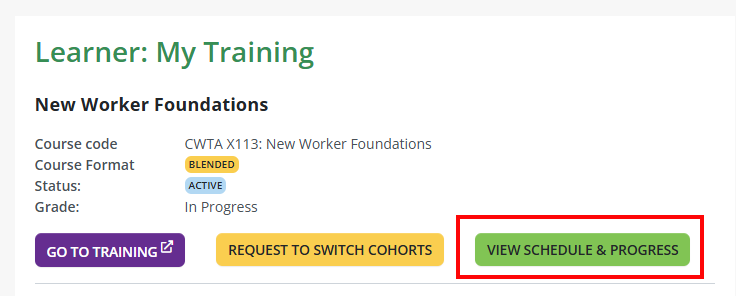
- Find the New Worker Foundations course under Learner: My Training.
- Select the View Schedule and Progress button to open the schedule.
- Find the session you’re attending and select View Link.

- Fill out the required information, then select Register.

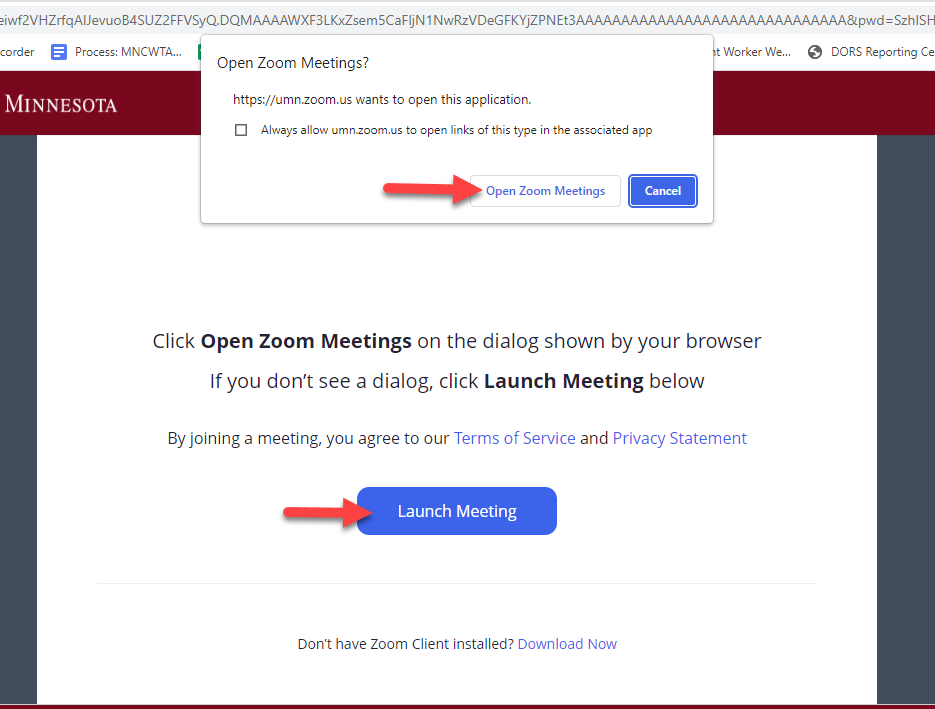
- Select “Open Zoom Meetings” on the dialog pop-up. If you don’t see a dialog, select “Launch Meeting”.
Related Articles:
If you need additional assistance, submit a ticket on the Contact Us page. If you do not get an email confirming your ticket has been received, follow the steps in the No Response: Help Desk article.
Was this article helpful?
That’s Great!
Thank you for your feedback
Sorry! We couldn't be helpful
Thank you for your feedback
Feedback sent
We appreciate your effort and will try to fix the article