Your training record will show an accurate list of your current enrollments, dropped trainings, and completed trainings. When you first access your training record or it's your first time registering, you will need to set up your training record account.
Step 1: Go to learning.umn.edu.
Step 2: Select "Learner Login" under the "Login" dropdown.

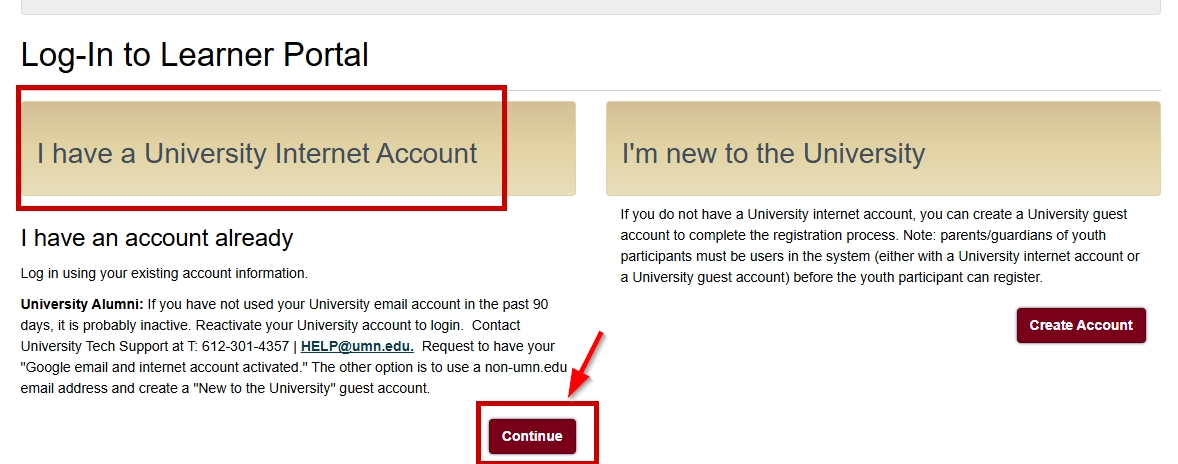
Step 3: Select "Continue" under "I have a University Internet Account".
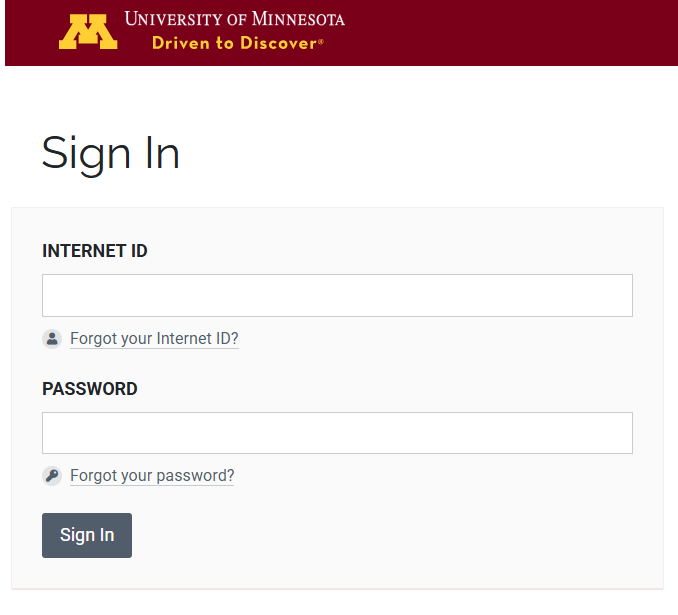
Step 4: A University of Minnesota sign in page will appear. Login with your portal credentials.
Step 5: Fill out the required fields and select "Submit". Now, your training record is activated and you can register for trainings.
If you need additional assistance, submit a ticket on the Contact Us page. If you do not get an email confirming your ticket has been received, follow the steps in the Help Desk: No Response article.
Was this article helpful?
That’s Great!
Thank you for your feedback
Sorry! We couldn't be helpful
Thank you for your feedback
Feedback sent
We appreciate your effort and will try to fix the article